Reflective Statement
My work ethic for animation has been abysmal really. With everything else taking priority, I pushed animation to the bottom of the pile and barely anything was completed, in addition to me being slow during class, which meant that I really had finished work even then. I couldn't even get the showreel to a minute. I am far from pleased with my work here.
Animator Reviews
Lotte Reiniger
Don Hertzfeldt
Uploaded Sessions
Session 1
Session 2
Session 3
Session 4
Session 5
Session 6
Session 7
Session 8
Update:
Apprently the music (which was used for the after effects test) I left in the video has been copyright claimed, so I have no idea if the video is even playable. So I've got an alternate silent version here.

Showing posts with label Toolkit 1. Show all posts
Showing posts with label Toolkit 1. Show all posts
Monday, 13 May 2019

Toolkit 1 Submission - Maya Tutorials
Reflective Statement
Even since the start of the year, I've been kinda behind on the Maya tutorials. This isn't to say that I didn't do the work in lesson, I did. It's just with the time constraints and the amount of work from the main projects Maya got pushed to the back slightly. Other than that, the other issue is Maya itself. Specifically its constant crashing. But I'm actually quite pleased with how much I've learnt with Maya over the last year and I am quite excited to go further into the programme.
Maya Tutorials Label
Introduction (Lego Car)
Digital Set (Chicken Coop)
Camera Movements
Animation Principles
Hard Surface Modelling (Scooter)
Organic Modelling (Alien)
Biped Rig
Even since the start of the year, I've been kinda behind on the Maya tutorials. This isn't to say that I didn't do the work in lesson, I did. It's just with the time constraints and the amount of work from the main projects Maya got pushed to the back slightly. Other than that, the other issue is Maya itself. Specifically its constant crashing. But I'm actually quite pleased with how much I've learnt with Maya over the last year and I am quite excited to go further into the programme.
Maya Tutorials Label
Introduction (Lego Car)
Digital Set (Chicken Coop)
Camera Movements
Animation Principles
Hard Surface Modelling (Scooter)
Organic Modelling (Alien)
Biped Rig
Toolkit 1 - Maya: Biped Rig


Unfortunately I never finished this, but Fantastic Voyage was running at the same time and all of my focus went to that. I'll definitely finish this at some point as I am aware how important rigging actually is.
Toolkit 1 - Maya: Organic Modelling

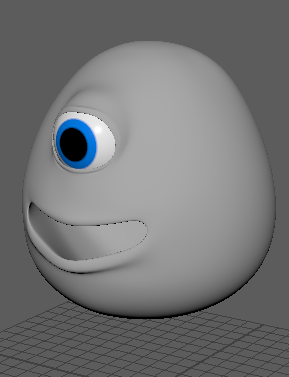

Unfortunately, I never finished this. I did have a version with a fully modeled tongue and teeth, but it crashed before I remembered to save. If I have any time left, I'll finish it.
EDIT:
I found the version with teeth and tongue. Still haven't finished the eye though.


Toolkit 1 - Maya: Animation Principles
Types of Animation
Keyframe Animation
Motion Paths
MEL Scripting
Dynamic Simulation
Animation Principles
Settle & RestSecondary Action & Overlap
Squash & Stretch
Anticipation & Follow Through
Rotation & Travel
Walk Cycle
Toolkit 1 - Maya: Camera Movements
Panning Shot
Roll Shot
Pitch Shot
Dolly Shot
Crane Shot
Distance Shot
Coverage
Camera Shake
Contra Zoom
Roll Shot
Pitch Shot
Dolly Shot
Crane Shot
Distance Shot
Coverage
Camera Shake
Contra Zoom
Toolkit 1 - Maya: Digital Set
For this mini project we were tasked with following both Simon's lessons and Alan's tutorials to create a farm scene.

This project was used to teach us modeling techniques and the basics of UV mapping.
It was also an exercise in Photoshop

Toolkit 1 Submission - Life Drawing
Reflective Statement
Not going to lie, I thoroughly enjoyed life drawing. I was unsure of it at first but it later became a way for me to relax slightly later into the year. I think my work also shows clear improvement over the year, which I am quite proud of. I believe it shows a clear building of confidence in my ability to draw. Obviously there is much more improvement to be done, but I think that my work here is a very good start.
Links to all Life Drawing Blogger pages (for large pictures):
Life Drawing Label
Session 1
Session 2
Session 3
Session 4
Session 5
Session 6
Session 7
Session 8
Session 9
Session 10
Session 11
Session 12
Session 13
Session 14
Session 15
Session 16
Not going to lie, I thoroughly enjoyed life drawing. I was unsure of it at first but it later became a way for me to relax slightly later into the year. I think my work also shows clear improvement over the year, which I am quite proud of. I believe it shows a clear building of confidence in my ability to draw. Obviously there is much more improvement to be done, but I think that my work here is a very good start.
Life Drawing Compilation by Terry Brunt on Scribd
Links to all Life Drawing Blogger pages (for large pictures):
Life Drawing Label
Session 1
Session 2
Session 3
Session 4
Session 5
Session 6
Session 7
Session 8
Session 9
Session 10
Session 11
Session 12
Session 13
Session 14
Session 15
Session 16
Thursday, 28 February 2019
Tuesday, 20 November 2018
Maya: Intro Project
Since the beginning of term we had slowly been working through Alan's Maya tutorials with Simon. This introductory project was to create a Lego car.
I forgot to take screenshots of the modelling and rigging processes, but I did create a still image and a quick animation.
Here's the completed model

And here's the completed animation. (Animated in Maya and edited in After Effects)
After the car was finished, Simon asked us to create our own Lego vehicle using everything we learned.
I decided to make a tank.

This was actually more complicated than the car, not because I decided it should have 6 wheels (rigging the wheels was actually quite easy), but because of the cannon at the front. The cylinder pieces were something that I had to create brand new. It was far less difficult than I had anticipated. I simply repeated the steps to create a normal 1x1 block, but instead of starting with a cube I started with a cylinder.
Not going to lie, I'm excited for what comes next with Maya.
I forgot to take screenshots of the modelling and rigging processes, but I did create a still image and a quick animation.
Here's the completed model

And here's the completed animation. (Animated in Maya and edited in After Effects)
After the car was finished, Simon asked us to create our own Lego vehicle using everything we learned.
I decided to make a tank.

This was actually more complicated than the car, not because I decided it should have 6 wheels (rigging the wheels was actually quite easy), but because of the cannon at the front. The cylinder pieces were something that I had to create brand new. It was far less difficult than I had anticipated. I simply repeated the steps to create a normal 1x1 block, but instead of starting with a cube I started with a cylinder.
Not going to lie, I'm excited for what comes next with Maya.
Subscribe to:
Posts (Atom)
-
 I finally got around to updating each of my characters. I wanted to get these all done before I get to work on my animatic. I'm reasona...
 -
With an updated story, I needed an updated script. If any one notices anything that needs to be change or anywhere they think I can improv...
-
 Final year, no graded toolkit, that however doesn't mean the lessons stop. In this first session there was three tasks to do, starting w...